
Make documentation part of the session, so less is waiting for you later.
SLP Daybook brings session data, SOAP drafts, lesson planning, and caseload management into one customizable workspace built for school SLPs.
Take attendance and record data with your group’s goals in view. Use that information to support individual notes and progress reports, while keeping your schedule and upcoming deadlines close by.
Join for private product previews, early access, and founding-member pricing when registration opens.
Built from a workflow school SLPs are already using.
SLP Daybook grew from the Google Sheets caseload system I originally built for my own work and later shared with other school SLPs.
“It has literally been life saving. I’m so much more organized, and I’ve already shown it to my coworkers.”
You already collected the information. Put it to work.
You take data during a session, then return to it later to write notes. When progress reports are due, you pull it together again. Meanwhile, your plans, student information, and IEP dates may each live somewhere different.
SLP Daybook connects those steps. Information entered during a session supports individual SOAP drafts, progress reporting, and present levels — so you spend less time rebuilding the same information in different places.
Built around what happens when the group arrives.
Your students’ goals, attendance, and data on one screen
Open a group and see the goals you’re working on. Take attendance, record responses, and document cueing and observations without opening a separate record for each student.
Track accuracy, frequency, duration, or support levels to match the skill you’re measuring.
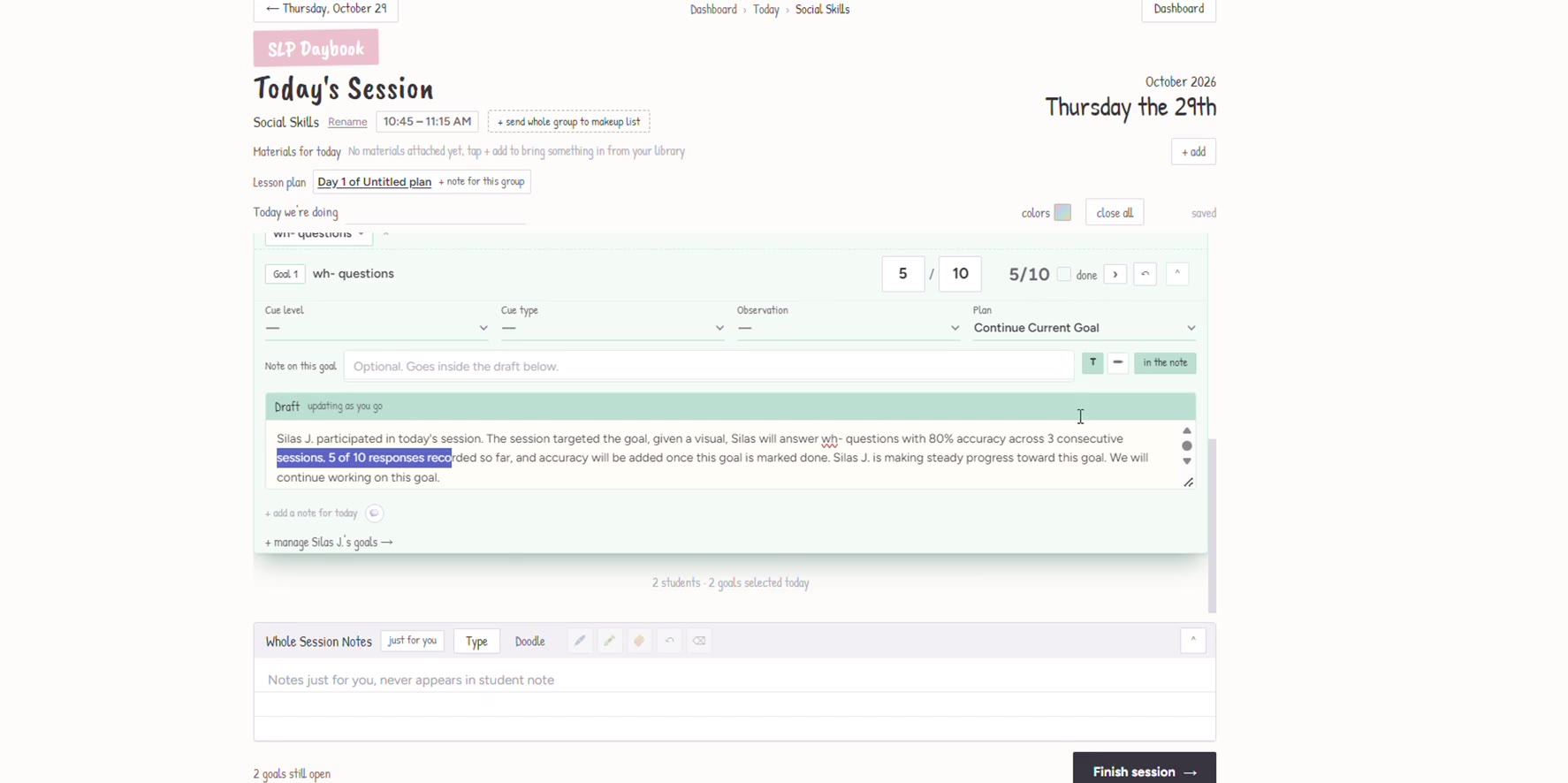
SOAP drafts you can review while the session is still fresh
Use the session information you’ve entered to build an individual SOAP draft for each student.
Review the wording, make your changes, and add the details that matter. Your clinical judgment stays part of the process.
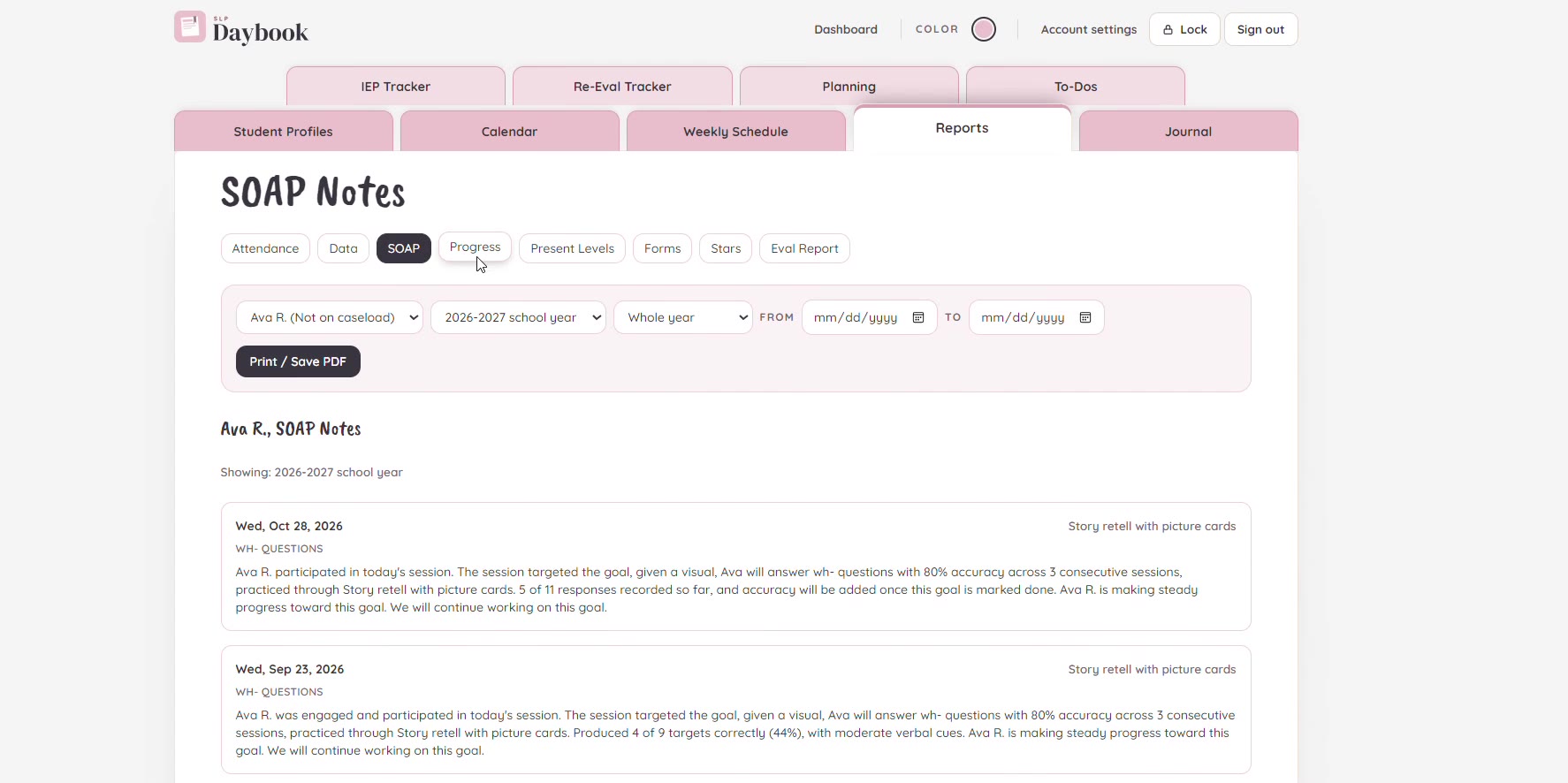
Session data you can return to when reports are due
Review recorded data and progress over time without piecing together separate session sheets.
Keep the information you need for progress reporting and present levels connected to the student.
Your workspace. Your way.
Tools for your sessions, students, and caseload — all in a workspace you can make your own.
Sessions & documentation
- Group attendance and individual goals in one view
- Accuracy, frequency, duration, and support tracking
- Cueing, observations, and session notes
- Individual SOAP drafts to review and edit
Progress & reporting
- Progress graphs and data reports
- Present levels
- Attendance reports
- Service minute and makeup session tracking
Caseload & deadlines
- IEP and reevaluation deadlines
- Absence alerts
- Case management checklists
- Meeting notices, consent, and follow up tracking
Planning & organization
- Weekly schedule and calendar
- Lesson plans connected to groups
- Your materials and links, organized where you need them
- To do list and reflective journal
Student engagement
- Student check-ins
- Reward system
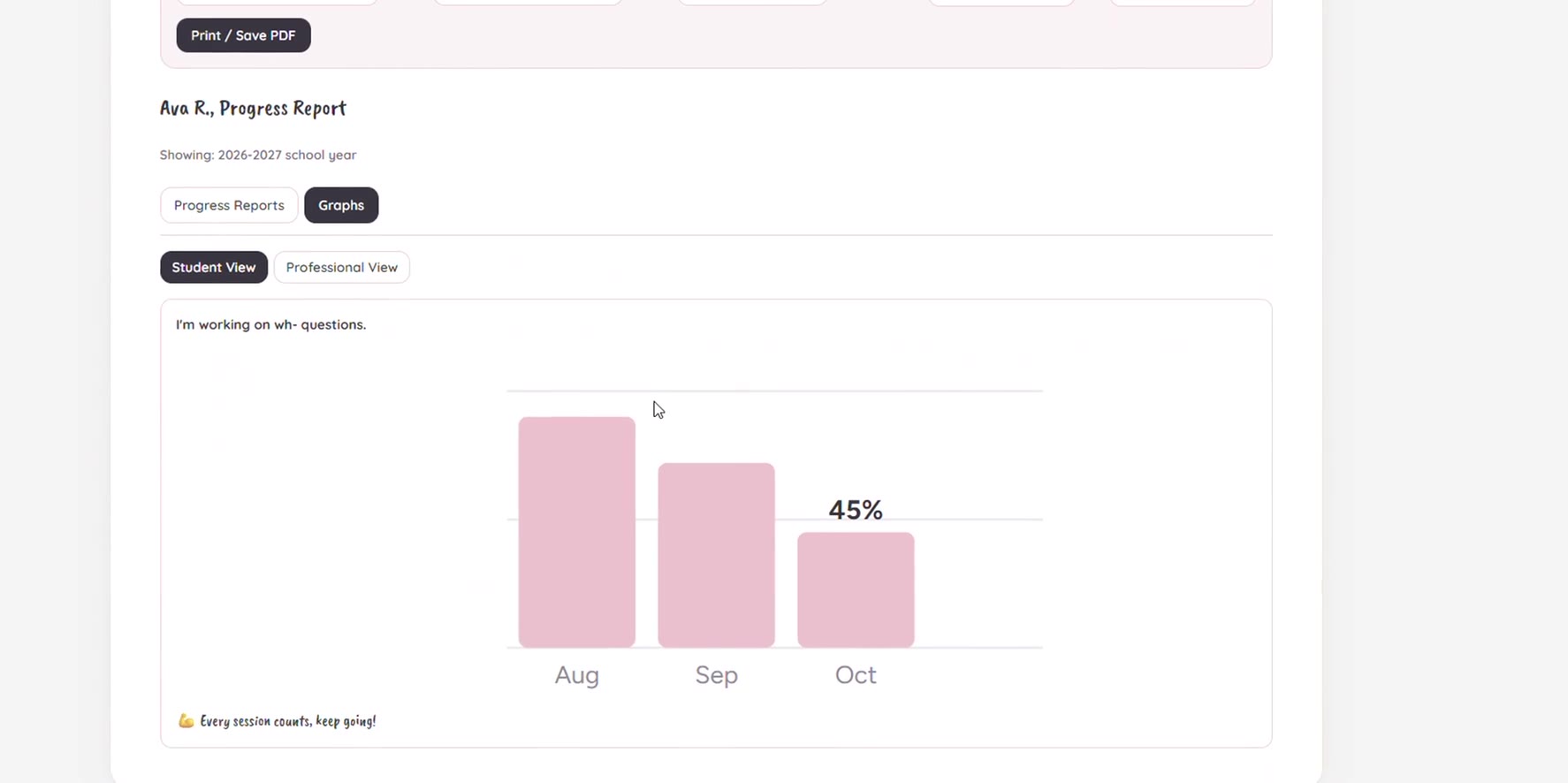
- Student facing progress graphs
- Speech at a Glance
Consults & input
- Consult forms
- Teacher input
- Parent input
- Student interviews
Sent directly from Daybook, with their status updated as they’re completed.
Customization & printing
- Customizable colors
- Editable templates throughout your workspace
- Printable plans, forms, reports, and student tools
Handovers & updates
- Student Handover Document
- Progress summaries for families
SLP Daybook should feel like your own personalized workspace, not another piece of software that dictates how you work. Choose your colors, customize your templates, and organize your day in a way that makes sense to you.
Hi, I’m Melissa, the school SLP behind SLP Daybook.
I knew what it felt like to open my laptop after school and try to remember details from sessions I’d already taken notes on. I wanted a system that helped me finish the work, instead of giving me another place to keep track of it.
I started by building a Google Sheets caseload system. Then other school SLPs began using it. They told me they felt more organized, shared it with coworkers, and sent ideas for what would make it even more useful.
That feedback gave me a reason to keep building.
SLP Daybook grew from that experience: knowing the work firsthand, creating something practical, and listening to the people using it.

Take a closer look before launch.
Join the SLP Daybook waitlist to see how it works and follow along as it gets ready to open.
Join the waitlistSneak peeks and launch updates, straight to your inbox.
A few things you might be wondering
- What will it cost?
- Founding member pricing will be announced before launch. Joining the waitlist is free and gives you early access to those details before registration opens. No card is required.
- Is this the Google Sheets workbook?
- SLP Daybook is a separate app. It builds on the idea behind the workbook, bringing session documentation and caseload tools together in a dedicated workspace.
- Can I use it with groups?
- Yes. You can view students’ goals, take attendance, and collect individual data from the same group session screen.
- Do I review the notes before using them?
- Yes. SOAP drafts are built from the session information you enter. You review and edit them to reflect the student’s performance and your clinical judgment.
- Is it available yet?
- SLP Daybook is being prepared for launch. Join the waitlist for previews, development updates, and launch details.